Overview Screen
The Overview Screen displays all current furnace information in groups as assigned by the user. You can also assign gaps (if enabled), begin new loads and, if necessary, enter historical loads.
NOTE: Instructions below assume that Gaps are enabled. If you are not using Gap options, some functionality will differ slightly.
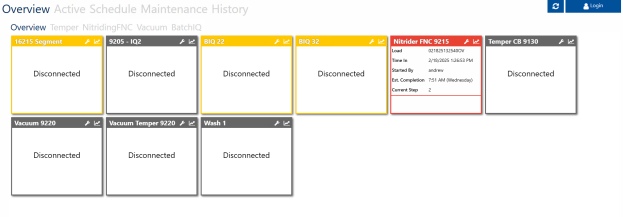
Click on a group to display the furnaces in that group. “Overview” will display all furnaces regardless of group.
Red indicates that a furnace has a critical Maintenance Task due, and thus is locked out. Yellow indicates that a non-critical Maintenance Task is due.
Click on a furnace to display information on its current status.
Click on the wrench icon to view (and start) any due Maintenance Tasks.
Click on the chart icon to bring up trend information from SDRecorder Pro. See the associated manual for additional information on this functionality.